
DOWNLOAD THE APP


Customer Services
Copyright © 2025 Desertcart Holdings Limited
DOWNLOAD THE APP

📺 Elevate your space with smart, sleek, and seriously smooth entertainment!
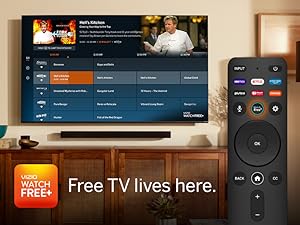
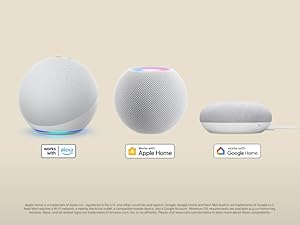
The 24-inch VIZIO D-Series FHD LED Smart TV (2023 Model) combines crisp Full HD picture quality with AMD FreeSync for smooth gaming and Alexa voice control for smart home integration. Featuring 260+ free streaming channels via WatchFree+, Bluetooth headphone capability, and fast dual-band Wi-Fi, it’s designed for millennials seeking a compact yet powerful entertainment hub with seamless app access and immersive visuals.



| ASIN | B0B286BGSL |
| Additional Features | 260+ Free Channels, Amd freesync, Bluetooth Headphone Capable |
| Analog Audio Output Count | 1 |
| Antenna Location | Home Viewing |
| Aspect Ratio | 16:9 |
| Audio Input | HDMI, USB |
| Audio Output Mode | Digital |
| Battery Type | 2 AAA batteries |
| Best Sellers Rank | #3,193 in Electronics ( See Top 100 in Electronics ) #22 in LED & LCD TVs |
| Brand | VIZIO |
| Built-In Media | XRT260 Voice Remote, 2 x AAA Batteries, Power Cable, Stand |
| Color | BLACK |
| Connectivity Technology | Bluetooth, Ethernet, HDMI, USB, Wi-Fi |
| Connector Type | HDMI, USB |
| Content Sharing Direction | Mobile to TV |
| Contrast Ratio | 3000:1 |
| Control Method | Remote, Voice |
| Controller Type | Remote Control, Voice Control |
| Customer Reviews | 4.1 out of 5 stars 1,838 Reviews |
| Display Backlight Technology | LED |
| Display Size Class | 24 Inches |
| Display Technology | LED |
| HDR Format Supported | HDR10 and HLG |
| Hardware Interface | Ethernet, HDMI, USB |
| Has Color Screen | Yes |
| Integrated Surround Sound Format | DTS StudioSound® |
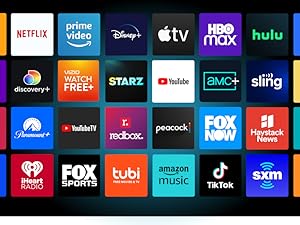
| Internet Applications | YouTube, Vudu, Amazon Instant Video, Netflix |
| Is Electric | Yes |
| Item Dimensions D x W x H | 6.3"D x 21.22"W x 14.37"H |
| Item Type Name | Television |
| Item Weight Without Stand | 5.86 Pounds |
| Line Voltage | Unknown |
| Manufacturer | VIZIO |
| Model Name | D24fM-K01 |
| Model Number | D24fM-K01 |
| Model Series | D24fM-K01 |
| Model Year | 2022 |
| Motion Enhancement Technology | True |
| Mounting Type | Wall Mount |
| Number of Audio Channels | Surround Sound |
| Number of Component Inputs | 2 |
| Operating System | Android |
| Parental Control Technology | Built-in device controls |
| Picture Quality Enhancement Technology | True |
| Portable | No |
| Power Consumption | 25.75 Watts |
| Refresh Rate | 60 Hz |
| Remote Control Technology | Bluetooth |
| Remote Required Battery Size | AAA |
| Resolution | 1080p |
| Screen Finish | Flat |
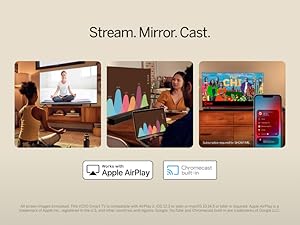
| Screen Mirroring Technology | Chromecast |
| Screen Size | 24 Inches |
| Signal Format | Digital |
| Speaker Description | 2 watts x 2 speakers, frequency response of 16.7 Million colors, viewable angle of 178° horizontal/vertical, and DTS StudioSound support. |
| Special Feature | 260+ Free Channels, Amd freesync, Bluetooth Headphone Capable |
| Specific Uses For Product | Home Viewing |
| Total Audio Out Ports | 1 |
| Total Number of HDMI Ports | 2 |
| Total USB 3.0 Ports | 1 |
| Total Usb Ports | 1 |
| Tuner Type | ATSC |
| UPC | 845226021695 |
| VESA Mount Standard | 100 x 100 mm |
| Video Encoding | AVC |
| Viewing Angle | 178 Degrees |
| Voltage | 120 Volts |
| Warranty Description | 1 Year Manufacturer |
| Warranty Type | Limited |
| Water Resistance Level | Not Water Resistant |
| Wattage | 25.75 watts |
| Wireless Technology | Bluetooth, Wi-Fi |
C**J
Diamond in the Rough
These features at this price, we are at a very good point for technology. Great picture, decent sound (when Volume Leveling is enabled in the sound settings). And, it actually IS an HDR TV! (However), i tried multiple things to enable HDR on my PC, adding a registry setting to enable HDR, something that can happen when upgrading to Win10, look it up for more info. Going through the TVs settings. Nothing seemed to work.. but then i had a thought, try a different HDMI cable. DING DING! Even though i was using a Vizio branded HDMI cable which should have allowed HDR, switching cables immediately allowed HDR to be selectable. If you have trouble with HDR your HDMI cable may be the cause. (HDR works with the Vizio branded HDMI btw after initially being enabled by switching cables) Regarding picture and HDR. Firstly, you SHOULD lower the Backlight to at least 50%, between 50 and 75% will do. Mostly because its way too bright, but also because lowering it will lengthen the lifespan of the LEDs compared to always being at 100%. And yes, BACKLIGHT, Not the Normal Brightness, that should be left alone and kept at 50, so only lower the Backlight. Secondly, HDR. When its turned on using a PC things can get EXTREMELYYYY BRIGHTTTT! Especially White! As my 1st experience with HDR i had no idea what to expect, So you will definitely want to lower its effect either through Windows HDR settings or through the TVs specific HDR setting, which i suggest doing. Games look AMAZING on this TV (picture settings should be changed to suit your needs), but everything looks great including Netflix etc. But games along with HDR and the TVs Game Mode and Low Latency mode is where it truly shines i think. And thats about it.. The only thing i dont like about this TV is it doesnt have an ethernet port, but WIFI 5 does just fine, but being able to use 1 or the other as a backup would have been nice.. Obviously a decent Router/Connection will help with this. Last Update: Regarding what i said about Sound still applies WITH Sound Leveling enabled, BUT as the TV allows connecting to Bluetooth Headphones AND Speakers that is the definitive way to go if you require better sound quality. The headphone jack also allows you to use an Aux cable with a bluetooth speaker which i highly recommend, WIRED audio quality will ALWAYS be better than Wireless/Bluetooth and its actually what i use when i gave both a try. Another Last update: Alexa usage, I grouped the TV with my office lighting so that when i say office on both the tv and the light turn on, same for saying office off, when im going out or going to bed they both turn off at the same time. I find this very handy instead of having to use the remote to do so, especially if in a hurry. And a bit of advice that EVERYONE can use whether buying this tv or not. As with most electronics it is BEST and recommended to use a decent Surge Protector to protect your electronics. Protecting our expensive toys is always a good thing to do. Another Update: Power usage, Normal PC/Built in Smart App usage you are looking at about 20watts, with the TV off (depending on settings, i.e Alexa control enabled etc, its around 10watts, you can turn those settings off to further reduce draw while Off if you so choose. So its very capable when it comes to using it with backup power or even a 150w Inverter and a 20V battery (Craftsman) for example as i tested earlier to gauge power usage. Latest update: Now using a 120W 2.0 Sound Bar with an Optical cable connected to the TVs optical port, cant beat a $40 ONN Walmart sound bar on clearance for $17, bought 2 as i knew they would sell quickly :). Definitely better than using an Aux splitter to connect 2 Bluetooth speakers for "stereo" sound, though they did do the job very nicely. Anything is better than the TVs speakers though, but even the TVs speakers can sound decent if set up the way i previously mentioned, this probably applies to similar Vizio TVs as well assuming they have the same sound settings. Jul 10th 2024: Tomorrow (11th) will mark 1 Year of owning this TV, absolutely no issues, was definitely worth getting. Hard to believe its already been a year. My only issue as previously mentioned is it doesnt have an ethernet port, dont get me wrong, WIFI 5 is PLENTY, but it would have been nice to have a backup connection down the road, just in case. Quality Surge Protection or even a small $60 300watt UPS with it built in is a must have for our toys, keep your tech safe. With the correct setup VRR DOES Work on PC not just on consoles like i assumed, NVIDIA as well not just with AMD GPUs. One very last thing, the remote has a button lockout, lets say you sit on it for an extended period or gets lost under a cushion etc so on and a number of the buttons are being pressed during that time, to save battery it locks the buttons. So if you try to use the remote and it doesnt work and the batteries are not an issue that would likely be why, just remove a battery and put it back in and the remote will function again. This might apply for future Vizio TV remotes as well so something to consider before seeking tech support. Hope this helps <3
S**U
This little Smart TV is worth every penny!
We needed a new countertop TV for our newly remodeled kitchen. I compared features on 24" Smart TVs for many hours. I settled on this Vizio. The resolution specs were impressive and the money was ridiculously low. The TV arrived. WOW! It was well-boxed and the set-up was simple. The picture is great. The sound is adequate for a small TV and it has Bluetooth if I wish to add a soundbar. The remote control was very well designed and easy to use. I was particularly blown away by their phone app. Not only can I control the TV using my Smart phone but can also watch their own channel line up called WATCH FREE+ right on my phone , if I choose. What a great little TV! Money well spent!!!
G**.
Great TV but there is on caveat.
I purchased this as a replacement for our Boat. The original TV received would turn itself on shortly after turning it off. Also intermittently the TV would go into setup mode on its own. I called Vizio customer service/support, which is very good I must say. They sent a replacement TV which fixed both problems. The reason for four stars instead of five comes from the inability to put your own apps on the TV. In our home we use over the air TV and an app called HDHOME RUN. In order to use this app or any other app that is not included on the TV you have to cast it. If I were not using this on the boat, but instead in the home, it would have been a deal breaker and sent back. To cast as you know requires another device to do so. That said what I do like is the Watch free TV app that it comes with. There are many stations you can watch over the internet with no antenna. Picture quality is very good and I like the Buetooth feature for adding an external soundbar speaker. This TV will satisfy most, the people it will not satisfy are who want to add their own apps.
J**N
Sharp, Colorful Images and Ease of Use
What a lovely little TV! I have it sitting on my L shaped desk because I wanted to have a small TV I could use to monitor weather or news while I worked at my computer, and this little TV is perfect for that. It's a Smart TV and uses Vizio's Free Watch UI. It's very easy to customize, you can add and remove apps with ease, and inside of 15 minutes, all of my accounts were set up and I was ready to go. The UI is very responsive, too, so no real lag that I can see. It loads up menus quickly and apps just as quickly. The sound quality is decent for such a small TV, though you'll have to turn it most of the way up to really hear it. I added one of my small TV soundbars to it and that improved it immensely, so I recommend that if you can. The picture quality is fantastic. Bright, colorful, sharp quality images. Even sitting on a two feet away from me on my desk, the picture quality is lush and vivid. Excellent, excellent picture quality. All in all, the price is unbeatable for a TV of this quality and with these features. If you're looking for a good smaller television for a bedroom or just as a second TV, you really can't beat the Vizio.
M**.
Terrible panel in this model, color is off even if adjusted.
Pros: Sound is adequate. Works with ROKU. Other that that NONE. Cons: No mater how I adjust the color settings, including calibrating, the colors are way off, gray is light purple, white is even lighter purple, when set to warm everything is orange and green. Calibration is a royal pain the posterior, and is useless anyway as it only makes the colors worse. The picture for video is grainy and blurred at the same time, cloudy looking like having cataracts in your eyes, even with a ROKU. The remote is sparse, and the only shortcut buttons are for PAID services, also the home button takes you to a page of PAID movies and services not to the apps you chose to install which are buried in a side menu only accessible by pressing the left side of the D-Pad/Navigation Ring. The GUI is nothing but ads for PAID services at the top of everything making getting to the content you want tedious and messy. I tried all settings and calibrations to no avail all colors remained incorrect! The screen also looks washed out, blurred, and foggy, as well as being pixilated and grainy like a bad CRT TV from the 1980s. Absolutely useless as a PC monitor all text is illegible no matter what settings are in use. Whatever panel Vizio is using in these models it is totally inferior to the older models. I have an older model: D24F-F1 and it has a far superior panel in it than this new model, color is also correct and all text is just as good as it is on my monitor. Vizio also changed the location of the VESA mounting holes moving them 2 inches higher towards the top of the screen making it a mismatch on a dual screen stand, a major deal breaker for me. The selection of so called FREE viewing is pathetic and most of the apps available in the GUI are paid subscriptions only. Conclusion: This is the third brand of newer TV I’ve purchased in a months time, and all have been thoroughly disappointing! I will be returning this one as well and will probably go with a decent monitor of the same size and use an HDMI Hub to switch between a ROKU and a PC.
L**A
Perfect size with great colors.
Just what I was looking for. Great resolution. Perfect for a studio and to connect to your pc.
S**E
Few connection options, sneaky upselling, and bad audio output design
Pros: Good picture. Lots of preloaded “apps” like Netflix, Prime, Disney, etc. Cons: 1. Minimal connection options. It has 2 HDMI, 1 USB, a cable jack and a headphones jack. The 24” Visio (D24-D1) I was replacing had a cable jack, a USB jack, separate R, G, B video jacks, left and right stereo audio jacks, an RJ-45 network jack, a PC audio jack, headphone jack and a composite video connector. The attached picture is my old set 2. No manual. A simple page on the controls, inputs and outputs would have been helpful. The online PDF “manual” is generic for all models in this product line and shows an optical output that my model doesn’t have (I don’t need one). 3. I want to run the audio through external speakers. The only audio output was the headphones jack. But when you plug in to the headphones jack, you can no longer control the volume with the remote control. You can see the level indicator on the screen increase and decrease, but the level of the sound does not change. 4. The setup was convoluted because Visio assumes you want to use the TV to run apps like Netflix and ESPN. I use Roku devices on all my TVs. But the Visio setup procedure had several “agree to terms” screens, including seeming to force you to accept Visio tracking your TV usage. They provide some kind of “free” TV but the setup took me to a screen where they wanted my credit card information. I can ignore all the sneaky personal info gathering and I can refuse to provide my credit card info. But the uncontrollable sound volume is very disappointing, and I am considering returning the TV.
M**3
Great RV tv!
I bought this tv for a small camper, along with a tv mount, and dvd player, it fits perfect and the picture and sound are awesome! If you're looking for a small tv, this tv will fit your needs. Although it's a "smart" tv, rest assured you can use it for dvd watching, or free channels when hooked up to an antenna. Why did you pick this product vs others?: Size, and ease of use. Ease of use: Getting to the hdmi inputs is easy with a dedicated button on the remote.
Trustpilot
1 week ago
2 days ago