
DOWNLOAD THE APP


Customer Services
Copyright © 2025 Desertcart Holdings Limited
DOWNLOAD THE APP


👶📲 Next-Level Baby Monitoring for the Modern Parent
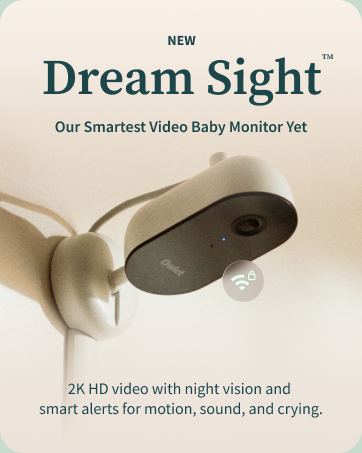
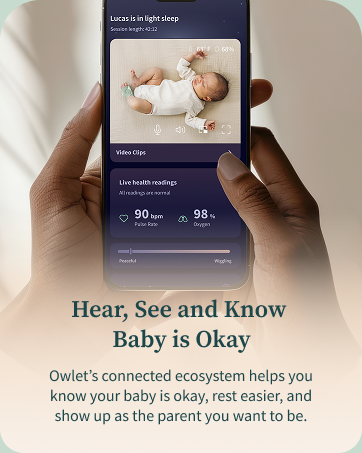
The Owlet Cam 2 (Gen 2) is a smart baby monitor featuring secure 1080p HD video streaming with night vision, 4X digital zoom, and a wide 130° field of view. It offers real-time temperature and humidity monitoring to ensure nursery comfort, plus sound and motion alerts to keep parents instantly informed. With two-way audio and encrypted WiFi connectivity, it enables seamless remote interaction and peace of mind for busy, tech-savvy parents.







| ASIN | B0B4BPRKGS |
| Alert Type | Audio and Motion |
| Antenna Location | Baby Monitoring |
| Are Batteries Required | No |
| Best Sellers Rank | #12,192 in Baby ( See Top 100 in Baby ) #34 in Smart Baby Monitors |
| Brand | Owlet |
| Built-In Media | Access to the Dream App with Predictive Sleep Technology, Adhesive Wall Mounting Kit for Baby Safety, Cable & Cable Guards, One Cam - With access to live HD video & audio stream in the free Owlet App, Swivel Magnetic base |
| Color | White |
| Compatible Devices | 2.4 Ghz Wifi, Android OS 7+, iOS 14+ |
| Connectivity Protocol | Wi-Fi |
| Connectivity Technology | 2.4 ghz Wifi |
| Control Method | App |
| Controller Type | Owlet Dream App |
| Customer Reviews | 3.8 out of 5 stars 820 Reviews |
| Effective Video Resolution | 1080.0 |
| Enclosure Material | Plastic |
| Field Of View | 130 Degrees |
| Focus Type | Auto Focus |
| Indoor Outdoor Usage | Indoor |
| Indoor/Outdoor Usage | Indoor |
| Item Dimensions | 2.25 x 2.25 x 7.8 inches |
| Item Type Name | Baby Monitor |
| Item Weight | 0.33 Pounds |
| Manufacturer | Owlet |
| Manufacturer Warranty Description | 1 year warranty. Try risk-free for 30 days & nights, and return for a refund if not satisfied |
| Model Name | Owlet Cam 2 |
| Model Number | BC06NNBBJ |
| Mount Type | Wall Mount |
| Night Vision | Night Color |
| Number of Channels | 2 |
| Number of Items | 1 |
| Optical Zoom | 4 x |
| Other Special Features of the Product | 2 Way Audio, Night Vision, Cry Detection, Motion Sensor |
| Power Source | Corded Electric |
| Recommended Uses For Product | Baby Monitoring |
| Room Type | Nursery |
| Shape | Oval |
| Special Feature | 2 Way Audio, Night Vision, Cry Detection, Motion Sensor |
| Specific Uses For Product | Baby Monitoring |
| UPC | 850028962770 |
| Unit Count | 1.0 Count |
| Video Capture Format | MPEG-4 |
| Video Capture Resolution | 1080p |
| Viewing Angle | 130 Degrees |
| Voltage | 5 Volts |
| Waterproof Rating | IP54 |
| Wattage | 5 watts |
| Wireless Technology | Wi-Fi |
| Zoom Ratio | 4:1 |
| Zoom Type | Digital Zoom |
F**S
Nice camera
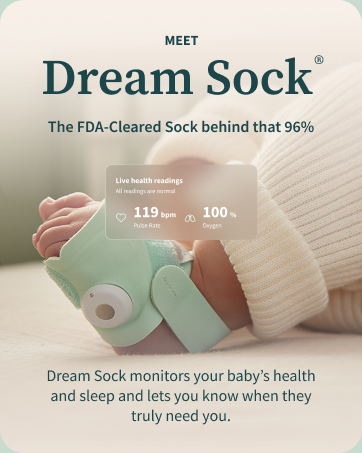
This is a nice camera with great features. I purchased this so that my husband and I could see our child while we are at work through Wi-Fi. It was very easy to set up you just download the app and follow the instructions on your phone. The camera will tell you the humidity and room temperature in your room and if it’s a comfortable environment for your child, it also has playback, audio, and background noise which you can turn off it the settings. The camera quality is very nice. It also has night vision and based on your Wi-Fi connection the first image quality is usually great. Through the app you can choose to have notifications tell you when your child is crying or like loud noises , however, I chose not to opt for that because if your child tends to cry a lot the notifications can get quite annoying. One downside that I found to this camera is that you have to manually rotate the camera whereas my other baby monitor camera be rotated from the monitor itself. It would be nice if you could rotate the camera from your phone that should be a feature they consider adding in the future. Also I usually will watch my phone and my other baby monitor screen while I’m in the house and I have noticed that there is a bit of a lag in the video playback with the Owlet camera compared to my other baby monitor camera. I use this camera in conjunction with the Owlet Dream sock. Overall I think this was a great purchase and I would recommend it to any new parent
S**3
Solid Cam
Sometimes disconnects randomly but otherwise works. Good quality video
J**S
Garbage camera (especially if it’s the second in the home) DO NOT BUY
Would leave 0 stars if I could. This was our second owlet camera since we had one for our other child’s room. For whatever reason it has serious problems connecting. We constantly have to try and un add, re add, re connect etc for it to work. It will work for 24 hours and stop again. Absolute nightmare and such a waste of money. DO NOT BUY!
A**A
Love with patience!
Love this!! Now, with that said I hated it the first week my baby was born because it’s harder than it looks to put on a tiny baby foot. Once I had a family member show me how to use it properly and my baby grew a little more, then it became the easiest thing to put on. I recommend putting a fitted sock over the foot monitor to help a little more. Also, it seemed like it didn’t like a sock and footed onesies because it would disrupt the signal. You might hate it right away if you are putting it on a newborn, but it does get easier to use as they grow and just takes some patience!
K**S
Be your child’s Big Brother.
This is a great tool for parents to keep an eye (and ear) on their precious ones. I highly recommend it. The way it calculates room temperature and humidity has come in VERY handy. There are notifications for cry detection that can be overwhelming because it picks up on EVERY sound, but those can be turned off.
J**N
Wish we switched sooner!
Upgraded our old monitor to this and I'm so glad we did. I only wish we did it sooner! Very happy with the quality of picture and the phone connectivity via the app. The app includes sleep tracking and predictive wake windows which has been super helpful to keep my husband and I on the same page as we sleep train our 6 month old. Very very happy with the camera. The cry detection/movements/room temperature etc everything is fantastic. Setup was a breeze!
A**Y
Disconnects Constantly. Unreliable.
The camera constantly disconnects and stops working (almost every other hour or 40% of the time I try to use it)... Sometimes it stops working on my phone (and says the camera is disconnected from wifi) but my partners phone will show the video with no issue. Seems very finicky. There is also a noticable lag and it ONLY supports 2.4 GHz wifi. At this point most people have 5 GHz wifi so you will run into issues connecting this to your wifi unless you know how to configure your network to 2.4 GHz. Also, the camera has the super bright blue light that illuminates the room and might degrade sleep quality. Lastly, at this price point, you can't even move the camera around remotely so it's lacking features that other cameras have.
L**.
Camera works, if you can get it to connect to WiFi and pair
TL;DR Frustrating to set up or use when traveling, spend your hard-earned money elsewhere. This camera is fine (video/audio/night vision), but the most infuriating and obnoxious part is trying to connect it to WiFi and pair with your phone/account. If you have to change WiFi (traveling, change ISP, etc.) you have to repeat the ENTIRE process and it never works the first 20 times (camera light won't blink, or won't say it's ready to pair, or won't read the QT code, or won't connect). Last time I ended up on the phone with tech support after trying all the troubleshooting things (i.e. making sure phone is on the same WiFi, the WiFi is 2.4GHz, etc.). Eventually just by trying for the 87th time, it ~*decided*~ to complete the process and connect. My husband tried to create and account and set up the camera on his phone/app/account, and it booted the camera from MY account, without ever working on his phone, so I had to again repeat the whole stupid process to get the camera working on my phone. Pro tip: don't set up a different account for other users, just use the login information for whoever set up the camera. Also, since it requires an app on your phone, unless you have a dedicated tablet set up with the app, good luck figuring out how Grandma or a babysitter would be able to use the device in your absence, unless you are cool with them downloading the app and giving them your username/password! Another minor annoyance is when using the sleep log, if you press the "Tap to start sleep session", but try to edit the start time, it automatically ends the session. Look, sometimes I don't have my phone on me or my hands are busy when the baby falls asleep, so I want to adjust the start time after I extricate myself, but before the little monster wakes up. I don't want to enter both start and end times manually later. It defeats the purpose of the app sleep session function. We don't use the sleep sock, but I can only imagine I would have absolutely lost my mind trying to get yet another component to work in this system. Also, from a friend who used the sock - the false alarms from the sock moving or falling off caused too much panic to be worth using it.
Trustpilot
3 days ago
2 weeks ago