
DOWNLOAD THE APP


Customer Services
Copyright © 2025 Desertcart Holdings Limited
DOWNLOAD THE APP

🚀 Scan smarter, save space, and stay effortlessly organized!
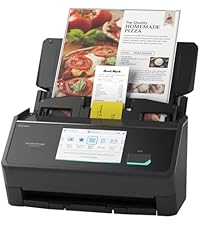
The ScanSnap iX1300 is a compact, high-speed duplex scanner designed for professionals who demand efficiency and quality. With up to 30 pages per minute scanning, versatile media handling, and both USB and Wi-Fi connectivity, it fits perfectly into tight workspaces while delivering crisp, color-optimized scans. Its intuitive software streamlines document management, making it the ultimate tool for digitizing your life without the hassle.





| ASIN | B09FX5DWBK |
| Best Sellers Rank | #2,737 in Office Products ( See Top 100 in Office Products ) #4 in Document Scanners |
| Customer Reviews | 4.2 4.2 out of 5 stars (1,627) |
| Date First Available | October 5, 2021 |
| Item Weight | 4.4 pounds |
| Item model number | PA03805-B005 |
| Manufacturer | PFU Limited |
| Product Dimensions | 11.7 x 4.5 x 3.3 inches |
A**R
If I could give 10 stars, I would
I’m probably crazy but 20 years after college I still was holding onto my college notebooks and I refused to throw them out. We needed the space and so I decided to scan them with a printer/scanner combo. With over 25 classes of notes, it was taking an hour per class PLUS the notes were not duplex so I had a scan of the odd and even pages. As with just about any printer, I basically need to fix it every time I use it. The printer/scanner experience is just a trash fire. After so many paper jams and not trying to lose my sanity, I started looking for another solution. It didn’t take long to find this amazing scanner. Amazon delivered fast and the install was effortless on my Windows 11 PC. The instructions are so easy to follow, you connect it with a physical wire and then immediately it shows you how to set it up for wireless. It just works EVERY TIME. This thing is fast. As I stated earlier, it was taking me an hour to scan a single class of notes with my printer/scanner. This scanner completed all of my 25 class notes in under 3 hours. Plus all the scans look beautiful AND they are duplex (front and back of pages) in PDF format. The software is so easy to use. I’ll admit that the first few scans required some adjustment but once I got it tuned it was perfect. I was also afraid of getting any new devices since space is at a luxury in my home office. This thing is small. It folds up and I can slide it into a drawer. Everything about this device is awesome and just well designed. If you need a scanner look no further. It isn’t cheap but you a definitely going to love what you are getting if you pick up this scanner. Just the time saved during the holiday season more than made up for the cost.
S**Y
This scanner is amazing...
I have been buying, owning & operating tech gadgets since the late 70's and this scanner ranks up there with the best on that list. Just look at these features: a) USB or Wi-Fi option b) compact size - easy to pull out when needed and then store for later - not a lot of desk space c) duplex scans of standard paper document in about 2 seconds each d) duplex scans photos at 600dpi in about 5 seconds each e) auto top feeder (about 10 sheets) or manual front feed We have another brand's multi-function color laser unit that we bought several years ago (for a good chunk of cash) which has served us well. However when the wife suggested we scan all our old photos (boxes & boxes of loose photos and shelves of photo albums) - I knew I was not going to spend years scanning two or three photos at a time with that thing's flatbed scanner. I read the reviews and most suggest another brand's scanner that is almost twice the price of this one. I decided to take a chance and be a bit more thrifty and it has worked out more than I could have hoped for. Mostly that decision came down to this model's manual front feeder. In one week I have spent about 4 hours with this scanner and have scanned almost 1k photos. The most time-consuming part is taking the photos out of the albums. I just pop them in the front manual feeder and then let the scanner spit it back out where the photo then drops into a bin underneath for disposal - each photo takes about 5 seconds scanning at 600dpi and the quality is good enough (note: the quality really depends on how good the original photo looks. those old 70's polaroid's are not going to scan and then be able to printed at 24"x36" size down the line - let's be realistic - but they look good enough to me on the computer reviewing them afterwards). My only wish is that it could scan at 1200dpi but that would certainly jack up the price. There are a few pictures which we put aside to scan with the multi-function scanner for this reason because those pictures have more sentimental value. I had two occasions this past week needing to scan a full-size paper bill and decided to use this instead of the multi-function. It scans a piece of paper both-sides so fast that it is done before you blink. The software is very basic but it is completely functional. Since this is just a scanner I am glad the software just concerns itself with the simple scan settings and not image manipulation or PDF editing. I have purpose-made software to do that other stuff.
W**5
Works great with Chromebook and Chromebox
Love this little scanner. I moved my home PC from a windows machine to a Chrome Box a couple years ago. Love the decision, but I had to retire my previous photo scanner, as it didn't have a Chrome Box interface. I've mostly only used the ScanSnap to scan photos, so I've only used it so far with the front feeder, not the auto document feeder, as not sure ADF will work with thicker photos. It's fast. You put the photo at the front feeder, the scanner gives you a second to get the photo square at the feeder, then pulls it in, and out the back, then pulls it in from the back and spits it our the front, all within a few seconds. Very quick and easy to put that photo on the "done pile" and insert the next. It stores lots of photos, I've done up to 80 so far, and then you copy the batch of scanned photos to whatever directory you want on your Chromebox, and scan the next batch. Setup instructions were a bit lacking. There's no "On Switch" on the scanner. If you open the ADF loader, the scanner seems to stay on, and the Chrome app can find it. If you don't have that open, the "Scan" button turns the scanner on, but not for long if it doesn't connect to the app. Once I figured to open the app, then quickly push the "Scan" button, I haven't had any problems connecting. I'm running it over WiFI, not USB printer cord. Never had to use the USB interface during setup, but you do need a WiFi, so I believe this would work well with an Android phone. The App window does scale somewhat for my Chromebox, not a phone size window on my big monitor.
D**T
No obvious from the listing that this will be shipped to the UK form Overseas. Arrives with a non -UK power plug
L**S
This scanner is amazing, so small yet can scan multiple items into your laptop or phone in seconds.
C**N
I really love this product. It is great at scanning numerous documents quickly. The only thing I notice is that I have to unplug and replug the scanner in the usb port to start up the software if you are not doing one scan after another.
M**D
Great!
M**R
This is a wonderful small but powerful scanner that substantially speeds up the scanning process. Its sheet feeder rapidly processes documents and scans both sides of the paper in one pass. It automatically will detect text and rotate the pages so that they are right side up and even do optical character recognition on them to make searchable PDFs. You can quickly scan photographs with the single sheet slot at the front bottom. So much faster than using a flatbed scanner or even a multifunction printer/scanner with document feeder. This unit is so much faster.
Trustpilot
1 month ago
3 days ago