
DOWNLOAD THE APP


Customer Services
Copyright © 2025 Desertcart Holdings Limited
DOWNLOAD THE APP

🚀 Print smarter, faster, and safer—because your work deserves nothing less.
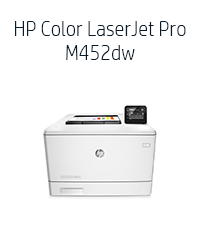
The HP LaserJet Pro M452dw is a wireless color laser printer designed for busy professionals who demand speed, security, and ease of use. With up to 28 ppm print speed, automatic duplexing, and a 3-inch touchscreen, it streamlines high-volume printing tasks. HP’s JetAdvantage Private Print safeguards confidential documents, while Original HP High Yield Toner cartridges deliver vibrant colors and cost efficiency. Ideal for office environments needing reliable, fast, and secure color printing.




| ASIN | B014CSKEQU |
| Additional Printer functions | Print Only |
| Best Sellers Rank | #308,816 in Office Products ( See Top 100 in Office Products ) #448 in Laser Computer Printers |
| Compatible Devices | Camera, PC |
| Control Method | Touch |
| Controller Type | Android |
| Customer Reviews | 3.4 3.4 out of 5 stars (378) |
| Date First Available | October 1, 2015 |
| Dual-sided printing | Yes |
| Duplex | auto |
| Global Trade Identification Number | 00888793383193, 00888793383230 |
| Hardware Interface | USB |
| Included Components | printer |
| Ink Color | cyan, magenta, yellow, black |
| Is Discontinued By Manufacturer | No |
| Item Weight | 49.6 pounds |
| Item model number | CF394A#BGJ |
| Manufacturer | HP |
| Max Copy Speed (Black & White) | 28 ppm |
| Max Input Sheet Capacity | 600 |
| Max copy resolution black-white | 4800 x 600 |
| Max copy resolution color | 4800 x 600 |
| Maximum Black and White Print Resolution | 4800 dpi |
| Maximum Color Print Resolution | 4800 x 600 |
| Maximum Media Size | 8.5 x 14 inch |
| Memory Storage Capacity | 256 MB |
| Model Series | Laserjet Pro |
| Number of Trays | 1 |
| Number of USB 2 Ports | 1 |
| Power Consumption | 570 Watts |
| Print media | Envelopes, Paper (plain) |
| Printer Ink Type | toner |
| Processor Count | 1 |
| Product Dimensions | 16.2"D x 16.2"W x 11.6"H |
| Scanner Type | Sheetfed |
| Sheet Size | A4 |
| Specific Uses For Product | business |
| Total Ethernet Ports | 1 |
| Total USB Ports | 1 |
| UPC | 889296585916 888793383230 |
| Warranty Type | limited warranty |
| Wattage | 570 watts |
M**S
Seriously Good Laser Printer
I returned a previous BW laser to order this printer because of its wireless features. I had a brief problem printing labels, not because of the printer but because the Avery software program did not permit me to adjust the printer settings back to default. Therefore I had to telephone HP and they instructed me over the phone how to reset the default settings. Avery denied the problem was caused by their software. The machine is heavy, 40 pounds of weight, so I would advise anyone not to attempt moving it from place to place without some assistance. It is about the size of a large microwave oven. You will hear it when printing but the noise level is medium. I like the envelope feed tray, I open the front door and load envelopes, very simple and they print correctly. I've used it to print postage stamps, labels, color prints, envelopes, letters and long documents. So far, everything prints great, except for the package mailing labels. The printer roller, after printing these labels transferred the ink to the next print job and I had black stripes across the pages of my document. Only does this with the Avery labels, so I do not know if it's a product problem or a printer problem. Since I rarely print labels, it is not a major headache. I use it strictly as a wireless printer and it takes about ten seconds for the job to go from PC to printer. Once it starts to print, it prints fast. Highly pleased with this printer, I did not want to purchase it due to the price, but I believe the quality is worth the price.
C**S
Updated Review - Toner Not Lasting/Poor Color
I got this to replace my color HP Laserjet 2500 which I bought refurbished 12 years ago (it was a fantastic printer and I almost had a memorial for it). I was hoping this one would be just a good and especially at such a great price. It's only been a few days but so far so good. I'm on Mac OS 10.8.2 and setup was super easy. I printed 160 double sided newsletters for a client's local mailing in a 1/4 the time it would take on my old printer. The printing is crisp so I'm happy about that. I have a home-based graphic design business and do a lot of printing so time will tell. UPDATE: Well I wrote too soon - right after I published my review, my new printer informs me that my toner is down to 5%! I printed 320 8.5/11 full color pages and that pretty much used up the CMY. My old printer really did print thousands of color pages before running out. Not sure what to do now, I don't really need to print for clients just myself but geeze for the cost of the cartridges, this is still going to eat up my budget. Not sure what I'm going to do yet, return it or use it very sparingly. The quality of print and time to print are excellent. So disappointed after being so elated - now my stomach hurts. FURTHER UPDATE 2/8/17: I don't think I was really paying attention to the color when I first plugged it in. I'm really disappointed in the color output. In spite of my best efforts to adjust color settings between my software apps and the printer (which I shouldn't have to do anyway) the color is dull and faded looking. In fact, no matter what I adjust it all prints out the same - bland. Areas with less than 35% color drop off completely. That's ridiculous. I got what I paid for. My HP Laserjet 2500 was excellent. What I saw on my screen is pretty much what I saw on paper and cartridges lasted a long time. I would not recommend this printer or purchase again.
B**P
Installation was absolutely maddening
Just as a disclaimer, I am an HP fan and advocate. I always look at their products first before considering another vendor. Having said that, I _think_ this will be a good printer. I purchased it because buying a full set of OEM color toner cartridges for my old printer cost more than this new printer. I also wanted wireless printing which my old printer would not support. So, I get it hooked up to a brand new Dell XPS desktop with 64-bit Windows 10 and I'm ready to install the thing. The installation guide gives the relevant web sites to get more documentation and the necessary drivers. The manuals downloaded just fine. The manual lists two links to go for the setup routines. The first link identified my printer but refused to download any drivers or programs. I either received a 'website not found' or it timed out after several minutes of trying. I then tried HP's 123.hp.com address which is supposed to be their omnibus installation site for their printers. Half the time this site would not open up. When it did, I could download the program. The program ran part way then stalled. I rebooted and tried again, multiple times. I downloaded the 64-bit Windows 10 version from the website and the file name had Win 8 in it so I'm not sure if the installation program is optimized for Win 10. I tried a few more HP links, several of which refused to open or Explorer could not find (I also tried Chrome and that didn't work either). So, you say, use the installation disk that came with the printer. Well, I tried and fell in the same loop as before. The installation program stalled at the step where it is trying to communicate with the printer. It just hung for several minutes and timed out. However, it did install the printer driver and I am able to use the printer. Oh - one last thing - there is also some program you are supposed to be able to install that will control the printer from your computer. All the links to get to the program fail or cannot be found. Now, on to wireless printing which is why I bought this blasted thing. The instructions were not clear how to do this so I fumbled a bit. I finally figured out that you get your laptop hooked up to your home network and try to install a new printer driver. The laptop identifies two drivers for the printer, one of which is the Wi-Fi option. I try to install it and it asks for a PIN number. The instructions STATE that this PIN number is written in the documentation that came with the printer or it is on the printer itself. After spending several minutes reading the instructions, nothing. I printed out the wi-fi report page from the printer itself and it does have a PIN number in the output so I figured this must be it - didn't work. Well, come to find out, the printer shows this pin number on its touchscreen (didn't notice it before because the laptop was in a different room). Ah, now I have it and will finish this off in no time. I try to install the printer on my laptop; the printer gives me a PIN; I enter the PIN and nothing; the driver will not install. I do this several times (the PIN changes each time - must be a random set of digits). I then spend quite some time with Professor Google trying to figure out what is going on - nothing. I then let things sit, reboot everything, and try again. Still nothing. In the end the driver was installed on my laptop but I have no earthly idea when or how it happened. The printer never gave any indication that the PIN number took. All in all, I think this is a great printer. Apple print works great and I can print from my laptop wirelessly. They only reason I bothered to write this tome is because half of HP's web links did not work and their installation programs and instructions were incredibly flawed. I pity the poor fool with less tech experience than me (and I'm not that great!) who may buy this printer. They will never get it running.
E**O
A impressora que comprei chegou no prazo, o produto veio lacrado na caixa da Hp e com os acessórios certos. Obrigado
A**S
Muy fácil de instalar y operar, tiene una excelente calidad de impresión, sin duda estoy muy contento con la compra.
A**R
This printer replaces a six-year old HP MFC that handled all our accounting requirements such as plain-paper printing, cheque stock, envelopes, etc. Like the old one, this one comes with 2 input sources (primary and 50-sheet feed) that handles 95% of our daily requirements. Setup, configuration and start up were painless for this low tach person. Speed and quality of output are excellent.
M**N
Works great so far. Did a lot of research and this has all the features we were looking for. Replacement toner is a little pricey, but not out of line.
T**M
Was 5 star until it broke after 4 months. Very disappointing HP. Makes a very loud grinding noise, not unlike my HP4250 before I replaced the swing plate gear - note the 4250 is what 15-20 years old? Edit - Amazon returned it immediately - well done amazon. I'm giving it another try. Edit 2 - Attempting to have amazon return it a second time. Broke again, grinding noise and skips page consistently, which I have never seen before. Two times now, makes for me more than a coincidence. I am trying another brand.
Trustpilot
1 month ago
1 day ago